
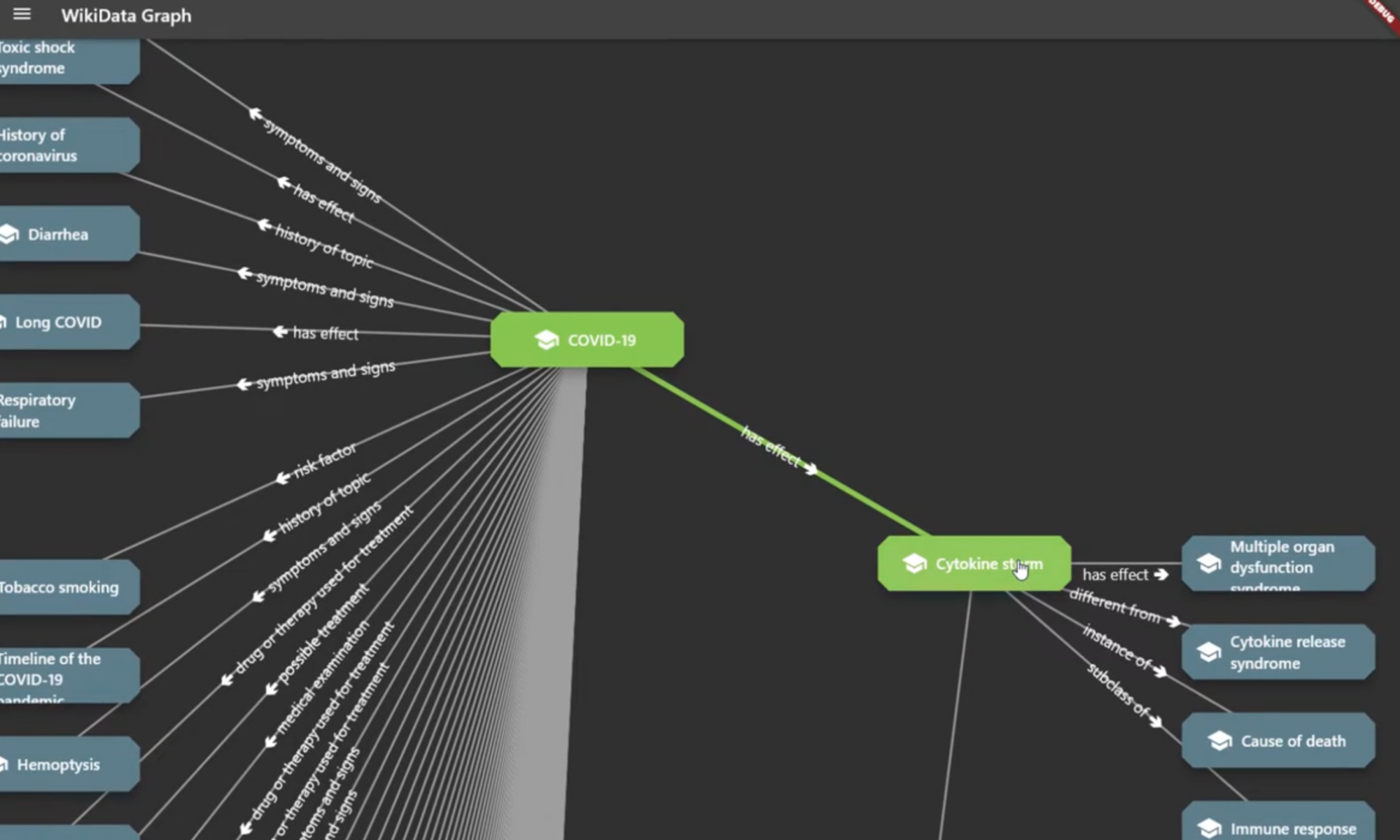
WikiData Graph and Graphist Flutter Package

This article is NOT generated by LLMs or AI tools.

Have you ever wondered how different concepts across the vast expanse of human knowledge are connected? For instance, what is the shortest path between a biological concept like COVID-19 and a medical condition like lung cancer? The answer isn’t found in a linear list or a traditional table, but in a graph. Quite a while ago, I worked on WikiData Graph, an application that visualizes these connections using a toolset I’ve developed called Graphist. In this post, I want to take you through the program itself, the architecture behind it, and how Graphist makes it possible to bring graph-based data to life within a Flutter application.

Read more: WikiData Graph and Graphist Flutter Package


The Project: WikiData Graph

WikiData is essentially the structured backbone of Wikipedia. While Wikipedia gives us the narrative, WikiData provides the entities (nodes) and the relationships (edges). Creating a tool that can traverse this knowledge graph allows us to uncover non-obvious links between disparate topics.

The WikiData Graph app serves as a practical demonstration of this. It allows users to input entities and visually explore how they are linked through a series of relations. For example, if you start with “COVID-19”, the app can query WikiData to find related entities—perhaps “SARS-CoV-2” or “Respiratory System”—and then further expand those nodes to eventually reach “Lung Cancer”.

The result is an interactive web of knowledge where every node is a gateway to more information, and every edge tells a story about how two things are connected.

The Engine: Graphist

Building a graph visualization tool from scratch in Flutter can be daunting. You have to handle the state of nodes, manage the connections between them, and ensure that the UI remains responsive even when the graph grows. This is why I created Graphist.

What is Graphist?

graphist is a Flutter package designed to add graph capabilities to any application. Instead of forcing you into a specific data model, it provides a flexible framework to represent data as Nodes and Relations.

The Core Concepts

At the heart of Graphist are three primary elements:

  1. The Node: A representation of an entity. It contains properties (like name, description, or a URL) and visual metadata (like icons).
  2. The Relation: A typed link between two nodes. Relations aren’t just lines; they carry their own properties, allowing you to describe how two entities are connected (e.g., “is-a”, “part-of”, or “caused-by”).
  3. The Graph: An abstract interface that manages the collection of nodes and relations.


Implementation Flexibility

One of the key design goals for Graphist was implementation agnosticism. Depending on your dataset, you might need different storage backends:

  • InMemoryGraph: Perfect for small to medium datasets where speed is critical and persistence isn’t required across sessions.
  • SqliteGraph: For larger datasets that need to be persisted locally on the device without loading everything into RAM. (this one is still experimental, but I’ll work on it more and share it here when I get a bit more free time)

By using an abstract Graph class, the rest of your application doesn’t care whether your data is sitting in a Dart list or a SQLite database; it simply asks for nodes and relations.

Bridging the Gap: graphist_wiki_data

While Graphist provides the “how” (the visualization and management), we still needed the “what” (the actual WikiData API integration). This is where graphist_wiki_data comes in.

This companion package acts as the translation layer between the Sparseq/JSON responses of the WikiData API and the structured Node and Relation objects that Graphist understands. It handles:

  • API Querying: Fetching entities and their properties from WikiData.
  • Mapping: Converting WikiData Q-identifiers into human-readable nodes.
  • Expansion: Dynamically fetching neighbors of a node to expand the graph in real-time.


Putting it All Together: The Workflow

When you use the WikiData Graph app, the flow looks something like this:

  1. Request: The user searches for an entity.
  2. Fetchgraphist_wiki_data queries the WikiData API.
  3. Translate: The raw API data is converted into Graphist Node and Relation objects.
  4. Inject: These objects are added to the active Graph instance.
  5. Render: The GraphWidget detects the change in state and renders the new nodes and edges on the screen.

This modularity is what makes the system powerful. If I wanted to build a “File System Graph” (which I actually did!), I wouldn’t need to touch the rendering logic or the core graph management; I would simply create a graphist_file_system package to map folders and files into nodes and relations.

Here is a demo video of it in action:

Final Thoughts

The beauty of graph-based data is that it mirrors how human memory works—through association. By combining the flexibility of Flutter with the structured approach of Graphist, we can move away from rigid tables and lists toward a more organic way of exploring information.

Whether you are building a knowledge base, a social network analysis tool, or a project management map, Graphist provides the primitives needed to get started without reinventing the wheel.

If you’re interested in diving deeper into graph implementations or want to try out the WikiData Graph demo, feel free to check out the repositories on GitHub!

Below is the list of repositories discussed in this post, and the flutter packages. In addition to WikiData, I have implemented a few more that I’m sharing here in hope it might be useful, especially as examples so you can build your own graph visualisations of exsisting data structures:

https://github.com/amin-ahmadi-com/graphist (The core library providing the graph capabilities and widgets.)

https://github.com/amin-ahmadi-com/graphist_wiki_data (WikiData implementation for Graphist)

https://github.com/amin-ahmadi-com/wiki_data_graph (This is the app discussed here. You can build and run it on Win/macOS/Linux)

https://github.com/amin-ahmadi-com/graphist_file_system (File System implementation for Graphist)

https://github.com/amin-ahmadi-com/file_system_graph (Another example: File System Graph Visualiser)

https://pub.dev/publishers/amin-ahmadi.com/packages (My pub.dev publisher account where all of the libraries can be found)