
Below is what I do for clearing and compressing my SQLite database files in Qt. Usually when you delete some entries from a SQLite database, it does not get deleted physically but instead it just gets marked as deleted and is not retrieved in queries. The good thing about this is that it works fast. But the obvious downside is the fact that the free space is not released. To release the space occupied by deleted files you need to do the following:
Continue reading “How to Reduce Your SQLite Database File Size Using Qt”OpenGL in Qt for Beginners
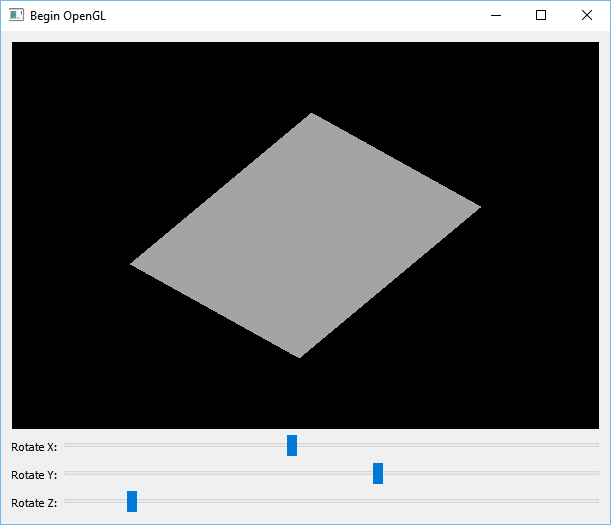
In this post I am going to share the source code and explain a very simple example project that can be used as a starting point for anyone who wants to begin using OpenGL in Qt. As it is seen in the picture, this program draws a single place on the screen and allows you to rotate it in all directions.
Continue reading “OpenGL in Qt for Beginners”How to Split a QString by White Spaces
You need to use a QRegExp to achieve this. “\s” means any white space character and “+” means any number of that pattern. So you can use the following line to find any number of consecutive white spaces and split you string:
line.split(QRegExp("\s+"))
How to Build Qt 5.6 Statically Using MSVC++ 2010

If you have already seen my Guide on How to Build Qt 5.5 Static wit MSVC then you probably won’t find anything new in this article. This only covers the paths and configurations for Qt 5.6 and it’s titled MSVC 2010 because Qt 5.6 installation includes pre-built libraries for all Compiler versions except MSVC 2010.
Continue reading “How to Build Qt 5.6 Statically Using MSVC++ 2010”How to Enable/Disable Qt Close Button
You can use the following piece of code in your Qt Window to disable Close (“X”) button in the title bar.
Continue reading “How to Enable/Disable Qt Close Button”How to Add Context Help Button to Qt Windows
You can use the following code to add Context Sensitive Help button (“?” button in the Window title bar) to your Qt Windows, that is QWindow or QMainWindow, not QDialog which has “?” button by default.
Continue reading “How to Add Context Help Button to Qt Windows”How to Open CHM Files and Topics in C++/Qt (Using Windows API)
In Qt/C++ you can open Compiled HTML Help files (*.CHM files) quite easily with a simple Win32 API function named HtmlHelp. In this post I have shared a wrapper function that you can copy and paste in your Qt/C++ code and use.
Continue reading “How to Open CHM Files and Topics in C++/Qt (Using Windows API)”How to Use SVN (Revision Control) with Qt
Whether you are developing PC (and mobile) applications for a company or for yourself, revision control should be a crucial part of what you do. The two major revision control systems are Git and Apache SVN. In this post I am going to show you how simple it is to use SVN with Qt.
Continue reading “How to Use SVN (Revision Control) with Qt”
How to Build for Windows XP Using MSVC 2015/2013/2012
To make your Qt application compatible with Windows XP (32-bit) you have to add the following line to your PRO file. Note that this will enable targeting for Windows XP without disrupting the application’s behavior in higher Windows versions.
QMAKE_LFLAGS_WINDOWS = /SUBSYSTEM:WINDOWS,5.01You also need to install Visual C++ Redistributable for Visual Studio 2015. You can find Microsoft official link below:
https://www.microsoft.com/en-us/download/details.aspx?id=48145
How to Use Qt to Create Hybrid Applications
First of all you can check this link if you don’t know what hybrid applications are and what the difference between Hybrid and Native application is. In this article I am sharing the source code of a simple application that uses Qt with a combination of C++ and QML to run Hybrid applications (written using Framework7, Ionic or Famo.us) on the Operating Systems of your choice (Android, iOS, WP, Windows, Mac OS X and Linux).
Continue reading “How to Use Qt to Create Hybrid Applications”